The photo will be upside down or sideways on resident profile when picture is larger than 120 X 120 pixels.
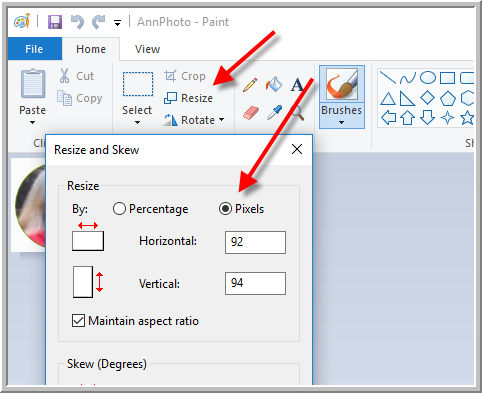
Here are the directions for changing the pixel size of Picture using Microsoft Paint. However, you can use application of your choice.
- Open Picture in paint.
- Click Resize
- Click Pixels. Replace the largest number with 120. (Horizontal or Vertical number)
- Save the file a jpeg or png then place it in folder of your choice and upload to Vitals.
Was this article helpful?
That’s Great!
Thank you for your feedback
Sorry! We couldn't be helpful
Thank you for your feedback
Feedback sent
We appreciate your effort and will try to fix the article