This article explains how to schedule a move out or transfer date for a resident. The move out date (or tranfer) can be scheduled or anticipated. A scheduled move out date is when the resident has provided a move out date to your community. An anticipated date is when it appears the resident may want or need to move out. (Some companies may use different terminology. If your company wants to use this feature and does not have any options please contact support@vitalsware.com)
A scheduled or anticipated move out date will allow the apartment to be reserved. This feature also should be used for residents that are going to transfer to another apartment in the community so the apartment will be available for reservation.
When the resident actually moves or transfers out of the apartment, refer to Knowledge Base articles How do I transfer a resident to another unit? or How do I move out a resident?
The steps to schedule a move out are:
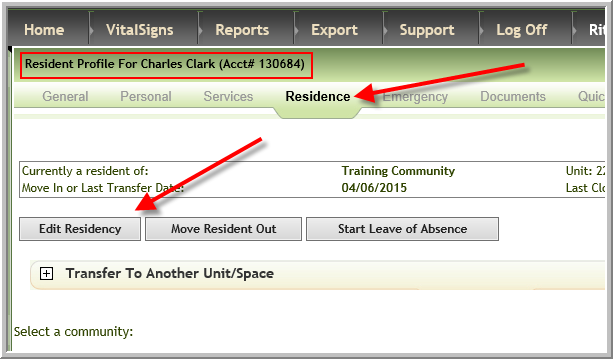
- Access the Resident's profile
- Click Residence, Edit Residency
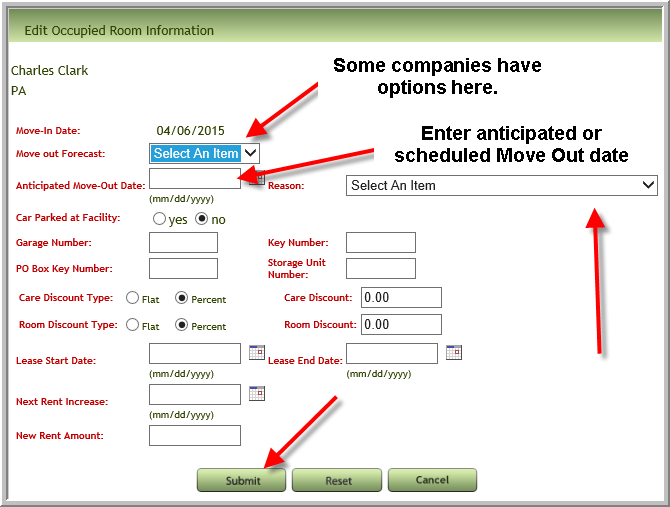
- Select either Anticipated or Scheduled, Enter the Anticipated Move Out Date and select a Reason from the drop down menu. Then click Submit
Note: Anticipated/Scheduled Move Out Date displays at top of the Residence tab and near the top of the General tab
Was this article helpful?
That’s Great!
Thank you for your feedback
Sorry! We couldn't be helpful
Thank you for your feedback
Feedback sent
We appreciate your effort and will try to fix the article