This involves making change to a lookup table.
Ideally one person, the Vitals Administrator, at a company will be responsible for updating lookup tables within Vitals because there are some concepts that need to be applied to any lookup table. Some people may not be adept at understanding the consequences of making changes to lookup tables and could cause problems for your company. The Vitals Administrator is encouraged to talk with subject matter experts at your company before making changes to Lookup Tables. Changes can effect reports. Therefore, it would be a good idea to generate reports that are important to your company before making changes and test again after making changes to ensure that reports still meet your needs.
- Never change the meaning of an existing item in lookup table. If you do, all of the residents/prospects with that option selected in the past will display incorrect information.
- Avoid having duplicate options that mean the same thing. For example don't have option of COPD and Chronic Obstructive Pulmonary Disease
- If you have too many options it can make data entry slower for users and can also make your reporting less meaningful.
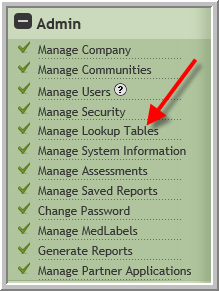
- Click Manage Lookup Tables
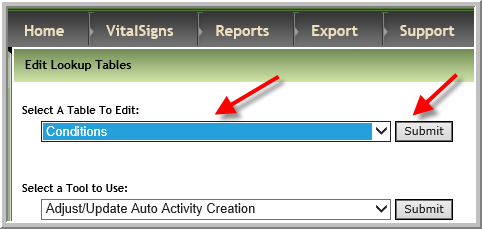
- Select Conditions
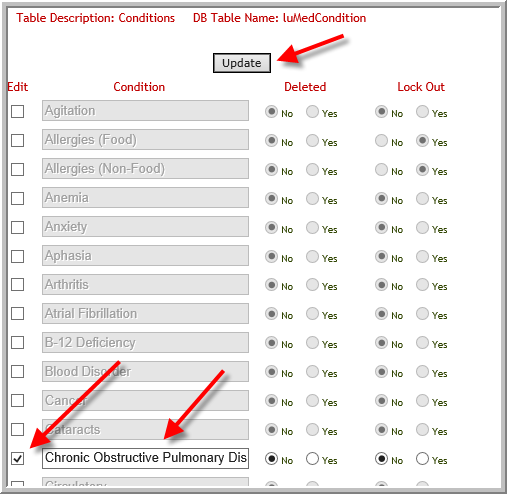
- To change an existing item click checkbox make changes, click Update
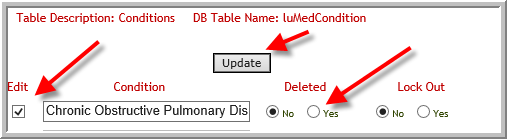
- To set an option to deleted, click checkbox, click yes in deleted column, click Update
- To add a new item scroll to the bottom of the screen, enter condition. Typically you will not click Lock Out. However, if a report for your company needs this particular information do click Yes so that the option is not changed in the future. (Most of the time leave the response as No)

(Note: Typically leave 'lock out' as No except on the GL Account Information table. When No is selected on the GL Account Information table users will not be able to edit a charge once it is added to Prebill.)
Was this article helpful?
That’s Great!
Thank you for your feedback
Sorry! We couldn't be helpful
Thank you for your feedback
Feedback sent
We appreciate your effort and will try to fix the article