If you do not have access to this area of Vitals you may need to ask your Vitals Administrator to enter the information. To enter budget information for each community:
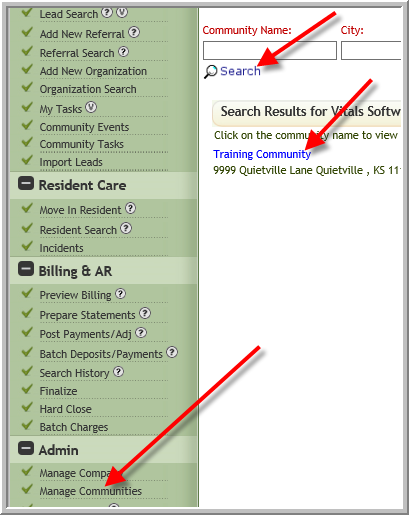
- Click Manage Communities-->Search -->Click Name of Community
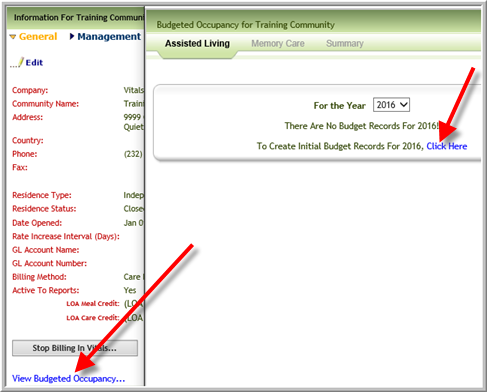
- Click View Budgeted Occupancy-->Click Here
- Select Product Type, enter budgeted apartment and/or units, click Update
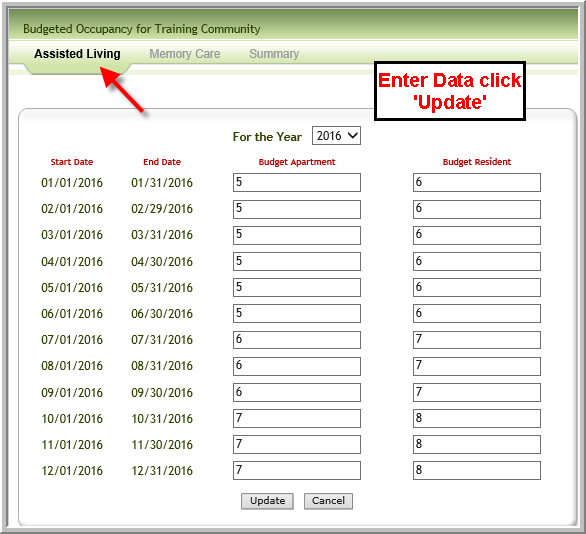 Note: When you click Update you will not see a change in screen.
 - Repeat above steps for other Product Types
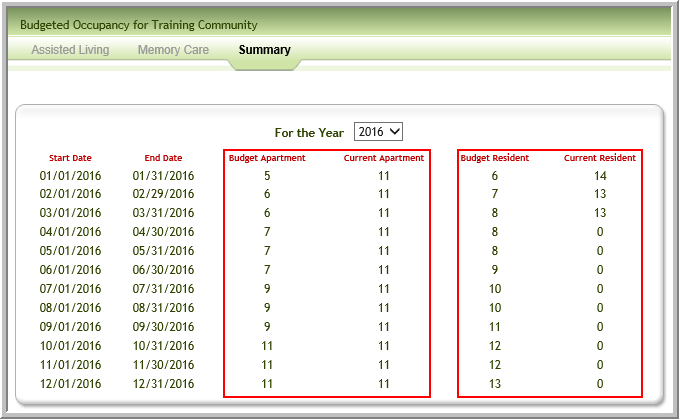
- The Summary tab displays the total of the budgeted apartments adjacent to the number of currently occupied apartments and the total of budgeted residents adjacent to the current number of residents.
Was this article helpful?
That’s Great!
Thank you for your feedback
Sorry! We couldn't be helpful
Thank you for your feedback
Feedback sent
We appreciate your effort and will try to fix the article