Typically Vitals Administrators or a particular individual selected by corporate office personnel at your company will be the one responsible for configuring assessment tool(s). Please read the following article before making any changes to Assessment Tool.
Comments options: The option selected here will determine the type of comments the user will enter whenever comments are necessary for questions throughout the entire assessment. (This option can be changed before using the assessment. Changing the type of comments after the PDF report for the assessment is in place will require development.)
Typically it is best to select No Enhanced Comments, Use Extended Comments, Use Extended Goals. This article does not cover using Associate with Care plan. 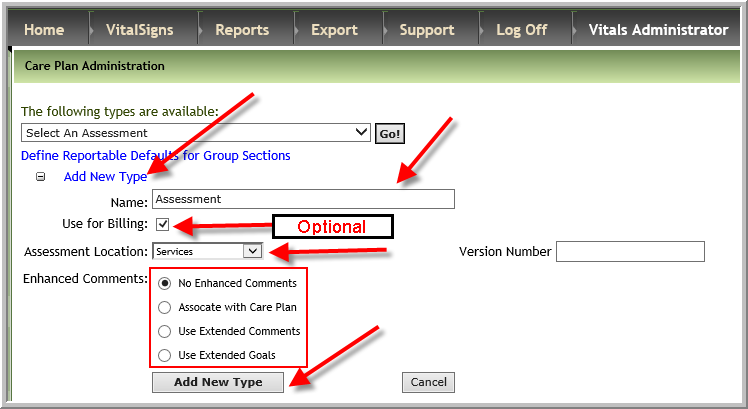
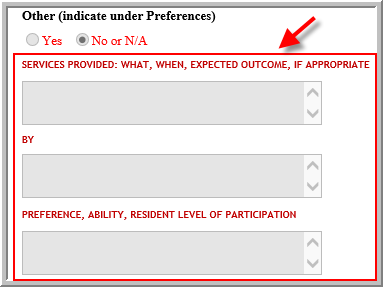
When No Enhanced Comments is selected as the option the user will have 1 text box to enter a response whenever a question has been selected to have a comment box.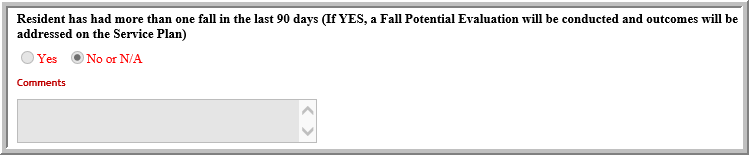 When Use Extended Comments is selected the user will have 3 text boxes where they can enter responses whenever a question has been selected to have comment box.
 When Use Extended Goals is selected the user will have 4 text boxes where they can enter responses whenever a question has been selected to have comment box.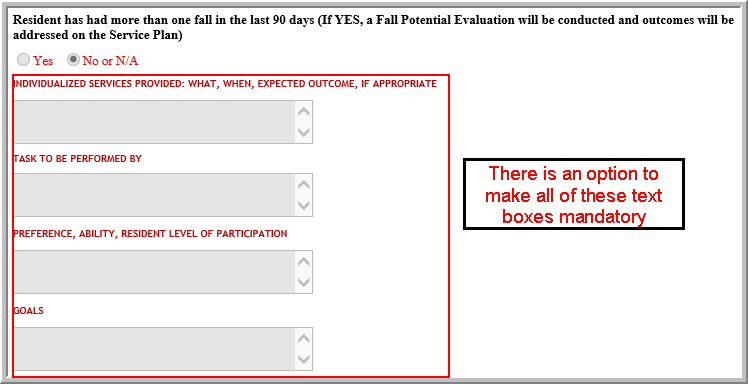
Was this article helpful?
That’s Great!
Thank you for your feedback
Sorry! We couldn't be helpful
Thank you for your feedback
Feedback sent
We appreciate your effort and will try to fix the article