Typically Vitals Administrators or a particular individual selected by corporate office personnel at your company will be the one responsible for configuring assessment tool(s). Do not change any assessment tool without proper authorization from your corporate office.
This article deals with Single Question type questions.
When Single Question is selected there are options of:
- Text
- Yes/No
- Checkbox
- Date
Information That Applies to All Question Types
The following information applies to each question type:
Points can be added to any question type. Typically the points are added to the right of the question but keep these things in mind:
- If you add points to a text or a date question every assessment will get those points. Typically you would use a different question type if you need points.
- Yes / No - The yes response gets points. If No is selected no points are assigned to that question.
- Checkboxes will get the points assigned to the question when the user selects that response.
Labor units and Responsible Employees have not been added to any current reports. Therefore, if you use this functionality there may be development costs to display information in reports.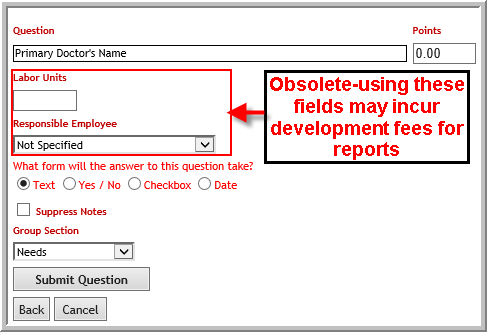
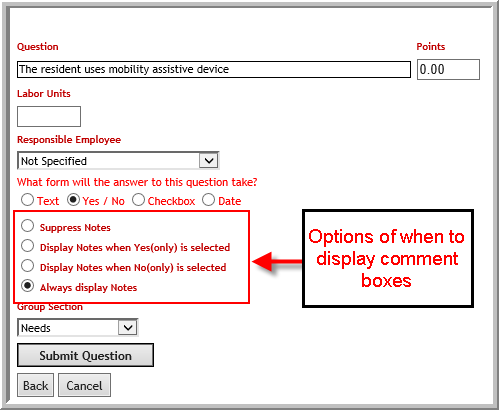
Each question type will let you determine when or if you want to display a comment box (or comment boxes if you have selected option other than 'No Enhanced Comments'). See Enhanced Comments .
Text
The text type question will have at least one text box where user will have option of entering a free text response.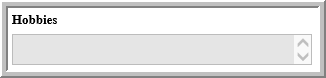
Yes/No
The Yes/No questions will let the user select Yes or No/NA.
- Some reports are designed to only display Yes responses. To keep the report short. If you are working with an existing report you need to test your report to see how it is designed because it will make a difference on how you design questions. For example, if your report is designed only to display Yes responses to questions...if you are trying to find out if someone needs assistance you would phrase the question:
"The resident needs assistance"
....rather than
"The resident is independent"
If the user selects a response that is hidden any comments made in text boxes will also be hidden. Therefore, it is a best practice to hide comment boxes for No/NA responses when your assessment report is configured to suppress no/na responses. - You can determine when comment box (or boxes) are available. (There are different types of comments available. Please read Comments.
Checkbox
The typical report format will only display comments when a checkbox is clicked. Therefore, typically you should select "Suppress Notes" or "Display Notes when Yes (only) is selected". If you test your report and do have comments displaying when a checkbox is not clicked you can select any option that you want to pick.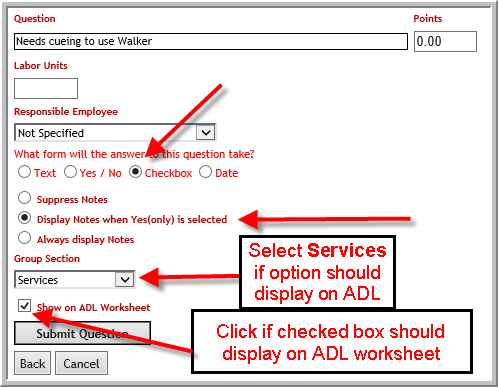 Note: The Checkbox question type allows you to select whether the response display on the ADL worksheet report as you are creating the question. Most question types require you to edit the question after you create it.
Date
This question type is used when you want the user to enter a date. Click Suppress Notes if the user does not need a comment box in the assessment.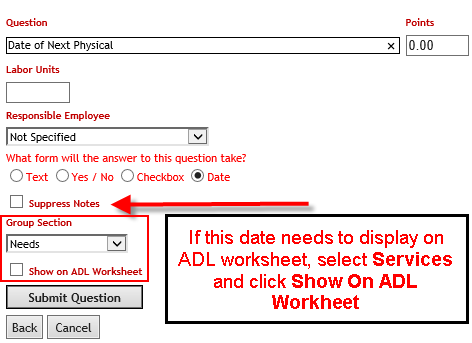 Note: It is unlikely that you will want a date to display in the ADL Worksheet report. However, if you do want the date to display in the ADL worksheet select Services for Group Section and click Show on ADL Worksheet
Show on ADL Worksheet
Some question types require you to save the question then edit before you can enable Show on ADL. Whenever you select Show on ADL also select Services as the group section type.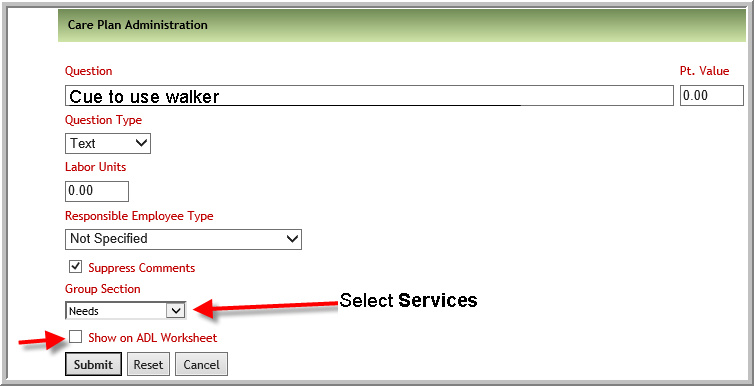
Was this article helpful?
That’s Great!
Thank you for your feedback
Sorry! We couldn't be helpful
Thank you for your feedback
Feedback sent
We appreciate your effort and will try to fix the article