The steps to merge referral contacts are as follows:
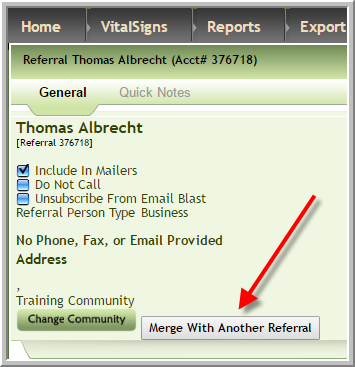
1. Access the referral contact that you want to deactivate
2. Click 'Merge with Another Referral'
3. Click the name if it displays or enter the name of the person that you want to merge the referral contact with, then click 'Search'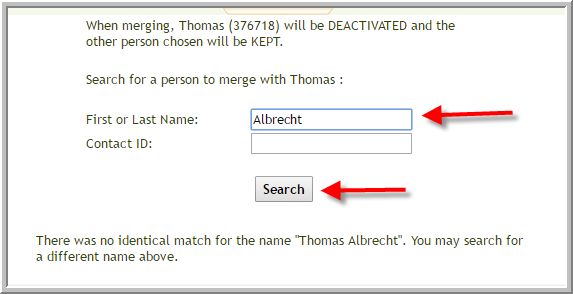
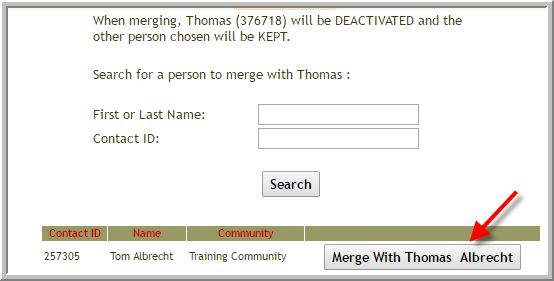
4.. Click 'Merge with ....'
5. Click 'OK'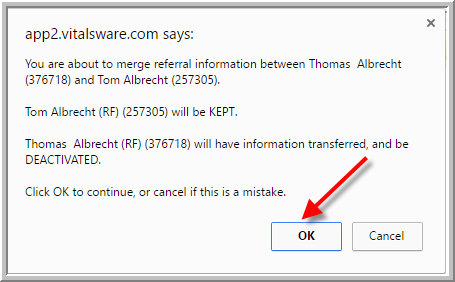
6. The referral contact that you selected in step 1 will be inactive, any residents or prospects that were connected to that referral will be attached to the referral contact you specified in step 3 or 4.
Was this article helpful?
That’s Great!
Thank you for your feedback
Sorry! We couldn't be helpful
Thank you for your feedback
Feedback sent
We appreciate your effort and will try to fix the article