If you have mailed a letter to a prospect or and/ influencers you can follow the directions below for completing an activity:
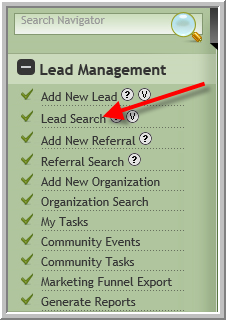
1. Click Lead Search
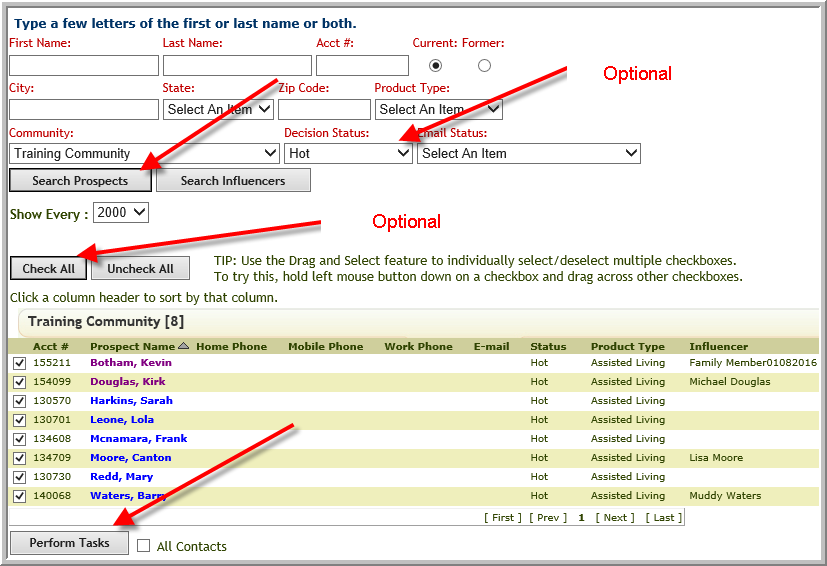
2. Search for the prospects that received the letter....it might be all of your leads or leads with a certain decision status or product type or email status.....
3. If you want to select all prospects from the selection above you can do so (even if they do not have a mailing address, step 5 will only select the prospects that have mailing addresses). Optional (Click Check All)
4. Scroll to the bottom of the screen click Perform Tasks
5. Click Good Addresses Only then click Add Marketing Activities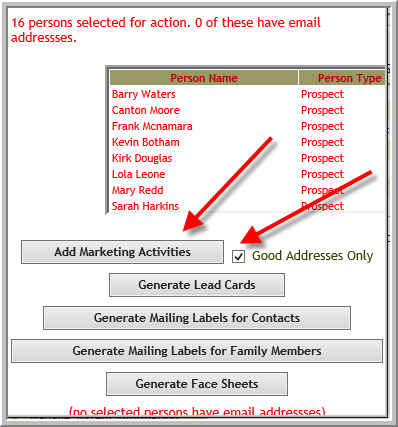
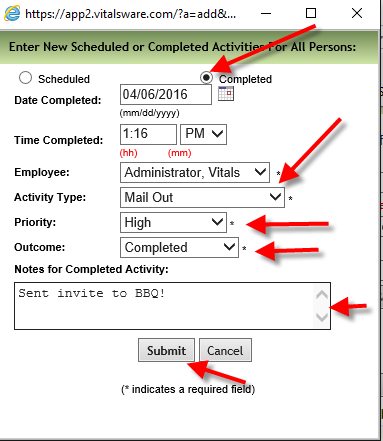
6. Click Completed enter information in fields, click Submit. (The options in drop down boxes may be different for your community.)
6. If you did same activity for influencers, repeat the steps above but click Search Influencers
Was this article helpful?
That’s Great!
Thank you for your feedback
Sorry! We couldn't be helpful
Thank you for your feedback
Feedback sent
We appreciate your effort and will try to fix the article