Some companies do not allow some users to change media sources. If you try these steps and they do not work for you please refer to your Vitals Administrator.
IMPORTANT: Vitals Best Practice is to have 1 Media Source per prospect. Because your reports will appear to be inaccurate if you have multiple media sources per prospect or if you don't have any Media Source. (It is acceptable to have a media source and referral when applicable.)
1. Access Prospect Profile
2. Delete the current Media Source if you are going to add a new Media Source, or click the current Media Source if you need to change the Source Notes
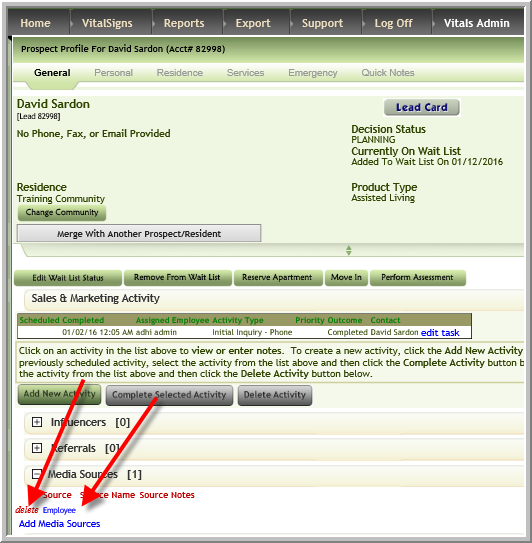
3. If you delete the Media Source ensure that you click Add Media Sources to add another Media Source. (Each prospect should have 1 Media Source)
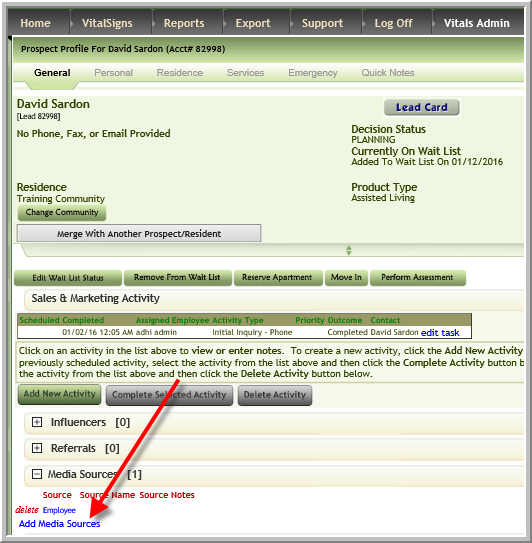
3. If you delete the Media Source ensure that you click Add Media Sources to add another Media Source. (Each prospect should have 1 Media Source)
Was this article helpful?
That’s Great!
Thank you for your feedback
Sorry! We couldn't be helpful
Thank you for your feedback
Feedback sent
We appreciate your effort and will try to fix the article