Vitals has reports where you can read all the quick notes for an individual. However, when you are in Quick Notes there is the ability to mark notes as read if you typically do not need to view those notes any longer for a contact such as a resident. However, if you want to re-read notes you can. This article explains the process of marking notes as Read and reviewing read and un-read notes.
Steps to Mark Notes as Read
Note: When notes are marked as Read they will be marked as read for anyone who views the notes.
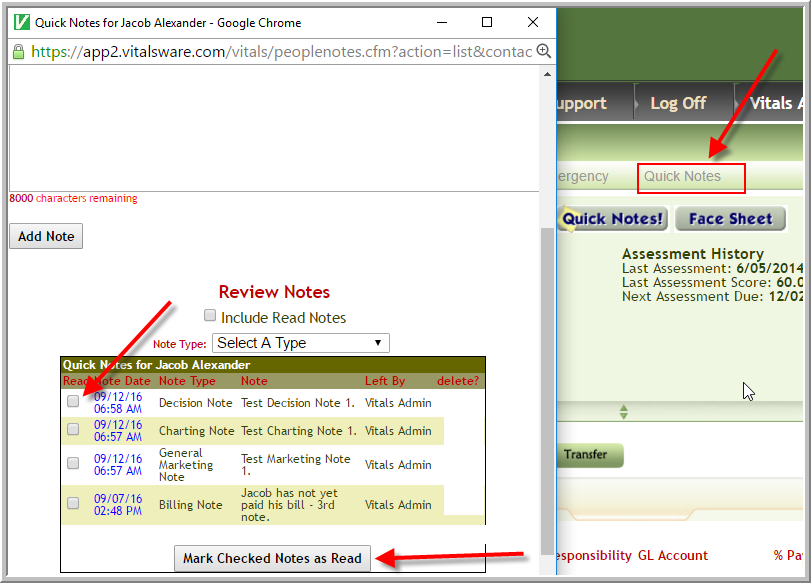
- Access Quick Notes for contact such as resident
- Click checkbox adjacent to note
- Click Marked Checked Notes as Read
Steps to View Read and Un-Read Notes
- The view defaults to Un-read notes.
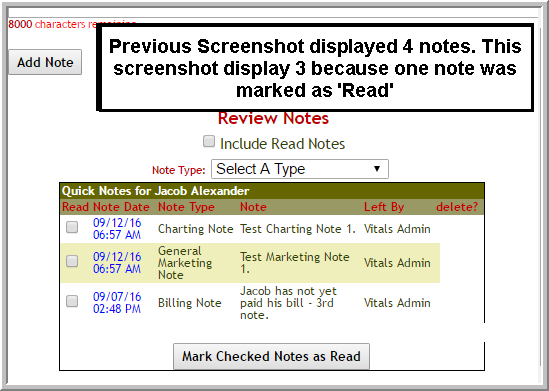
- To view Un-read notes too, click Include Read Notes
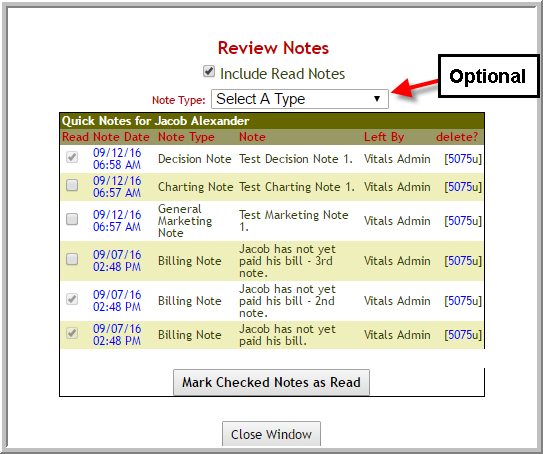
Note: While it is optional to select a Note Type to view....it is important to select a Note Type when creating Quick Notes or some reports may not properly display information.
Was this article helpful?
That’s Great!
Thank you for your feedback
Sorry! We couldn't be helpful
Thank you for your feedback
Feedback sent
We appreciate your effort and will try to fix the article