Preview Billing Best Practices
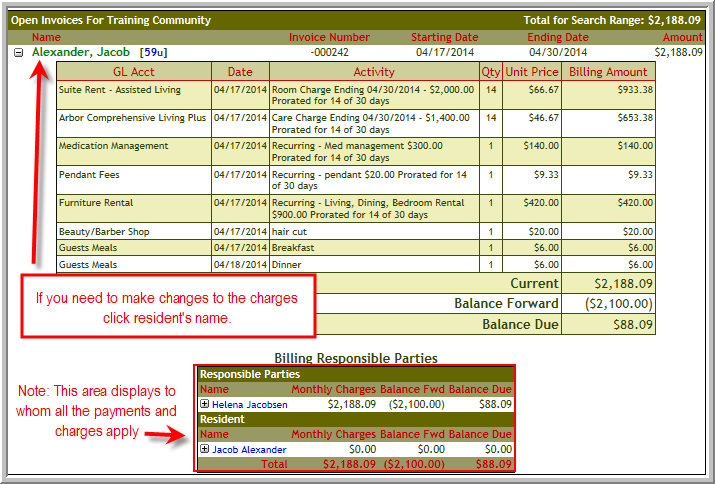
You will want to review all open invoices for accuracy before finalizing. This will be your last opportunity to add any charges before the invoice becomes “final”. The Preview Billing function or the Rent Roll report are excellent tools for confirming that all charges are being billed correctly to each resident and that you have not missed billing a resident for anything. If needed, you can export the Rent Roll report into Excel. By doing this, it is easy to compare the prior month’s rent roll report to the current month’s report. This will allow you to identify any changes/additions that may have occurred over the past month.
Note: To help insure you are able to “finalize” on schedule, it is recommended that the accounting department set a firm date for all ancillary charges to be turned in. Also, to allow the accounting department time for ancillary charge entry it is advisable to set this cutoff date at least 3 days prior to your preferred invoice finalization date. Any ancillary charges not turned in by the cutoff date will be charged on the next month’s invoice.
- Enter all of the charges that apply to the billing cycle in Pre-Bill.
- If you do not add all charges before finalizing the invoice, you will need to add those charges to the next month's pre-bill.
For example, say that your resident had a guest meal incurred on 4/17, the invoice was completed on 4/20 and then the charges were submitted to the BOM after the billing for April has been closed. Typically we recommend leaving the April charges as they are when you completed the invoice. Enter the 4/17/2014 charge with the proper date in the May pre-bill. - Before you complete the invoice in Statement Close ensure the charges and balance forward are correct. If not, add the charges in Pre-Bill and add payments if applicable in Post Payments/Adjustments.
Was this article helpful?
That’s Great!
Thank you for your feedback
Sorry! We couldn't be helpful
Thank you for your feedback
Feedback sent
We appreciate your effort and will try to fix the article