The Incident Reports can be printed using your browser's print capability. Access the report you want to print then use your browsers printing capability.
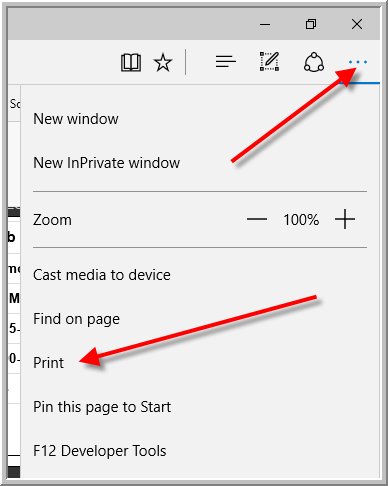
Edge
You will find a Print option by clicking More icon that looks like 3 dots, then click Print
Google Chrome
You will find a Print option under customize icon which look like 3 horizontal lines.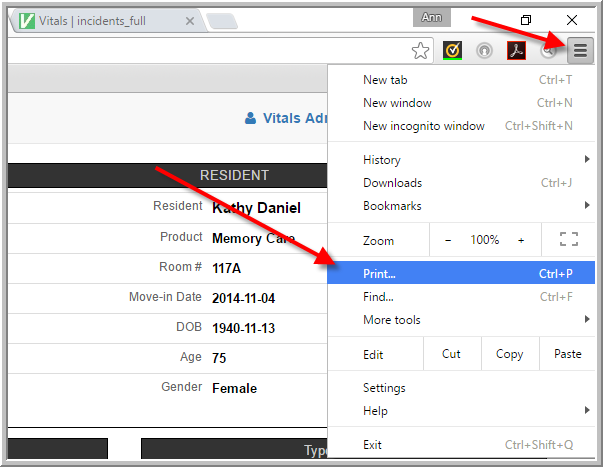
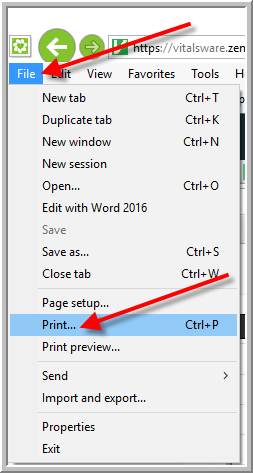
Internet Explorer
We recommend you do data entry in Chrome. You cannot use Internet Explorer for data entry in the Incident Module. However, if you want to print report from Internet Explorer, you will find the Print option under the File menu in the upper left corner of the browser window.
Mozilla Firefox
You will find the print option by clicking Open Menu icon that looks like 3 horizontal bars, then click Print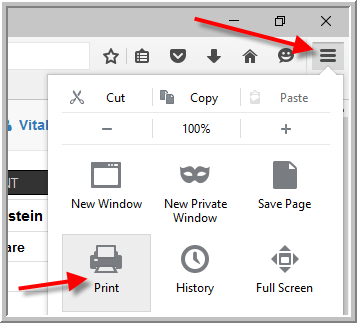
Was this article helpful?
That’s Great!
Thank you for your feedback
Sorry! We couldn't be helpful
Thank you for your feedback
Feedback sent
We appreciate your effort and will try to fix the article