If you try to follow these steps and find you are unable to access/view some of the steps illustrated in this article you may need to refer to another employee in your community or to your company's Vital Administrator.
1. Click Manage Communities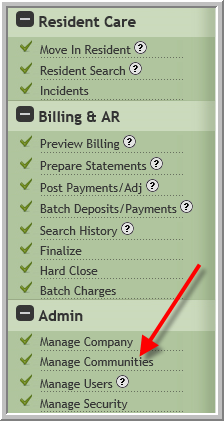
2. Click Search then click Community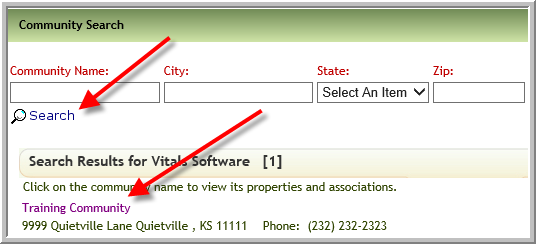
3. Click Occupancy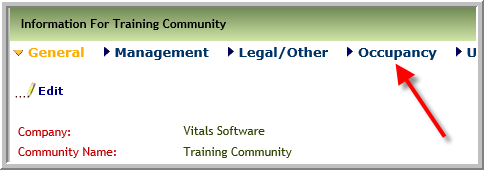
4. Click View Former Residents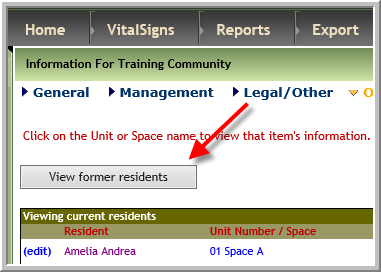
5. Click edit adjacent to resident's name. Be careful the resident may have moved in and out several times. Ensure you are editing the correct record.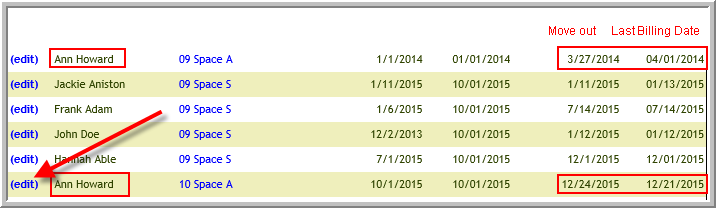
6. Make changes to Move Out or Last Billing Day click Submit. This will not alter billing. Manual change will need to be made to billing in Post Payments/Adjustments.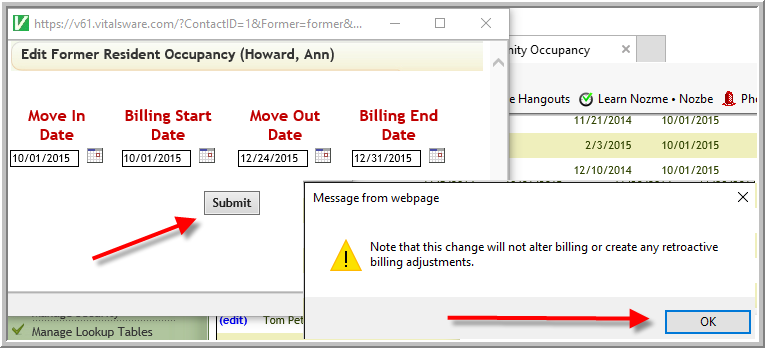
Was this article helpful?
That’s Great!
Thank you for your feedback
Sorry! We couldn't be helpful
Thank you for your feedback
Feedback sent
We appreciate your effort and will try to fix the article