1. Click Edit Wait List Status or Click Residence-->Edit (for reservation)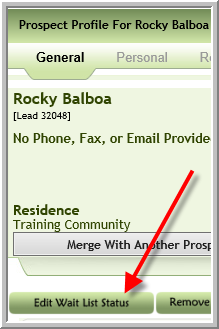
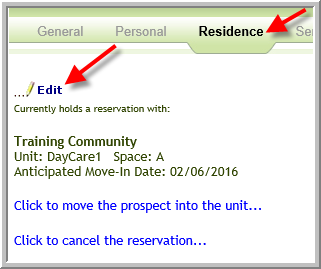
2. Enter the original date the prospect was added to wait list if you have this option at your company.
If the payment made for the wait list or reservation that was initially entered was in error and was less than it should be enter another payment. (Or if the prospect has made an additional payment enter the additional payment information.)
Enter the amount paid, payment type, check number, payment date. Click Update
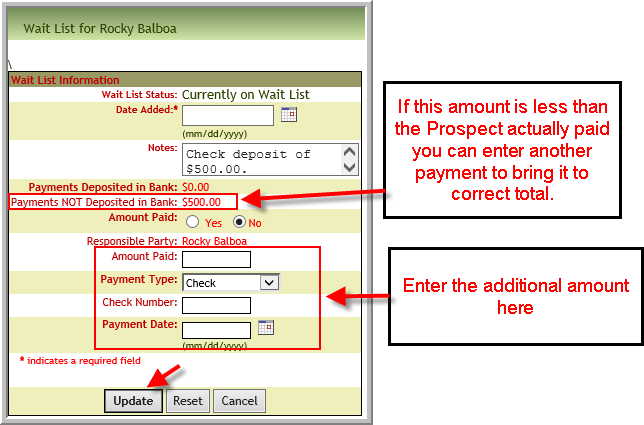
Note: In the above screenshot the $500.00 payment was not deposited in the bank.
3. If the payment that was originally entered was more than the prospect actually paid, and if the payment was not deposited in bank, click Remove from Wait List. (or click Residence-->click Click to Cancel Reservation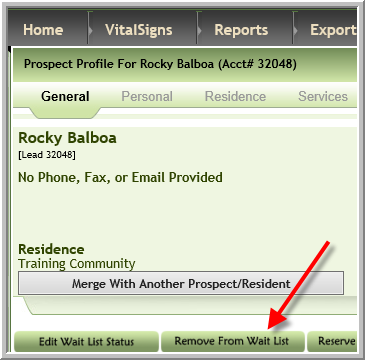
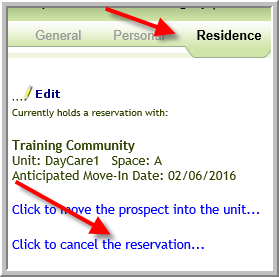
4. Click Add to Wait List enter the Wait List information including the correct payment information or Reserve apartment again entering correct information.
5. If the payment has been deposited in the bank, please refer issue to your employee who does billing so they can make corrections as needed in Post Payments/Adj.
Was this article helpful?
That’s Great!
Thank you for your feedback
Sorry! We couldn't be helpful
Thank you for your feedback
Feedback sent
We appreciate your effort and will try to fix the article