Automatic Late Fee Calculation
Many Vitals customers will have their communities set up to automatically apply a late fee to any resident's unpaid balance after a certain date. Verify with your Vitals Administrator if this process has been put in place for your organization.
Deleting the charge
Late fee charges are typically "locked" on the Pre-bill screen and cannot be deleted without contacting a system admin.
Crediting the charge
It is recommended Vitals best practice to "credit" an unwanted late fee charge rather than deleting it. This lets the resident know that the late fee was credit back as a grace. It also allows for tracking of the number of credited late fees in the system.
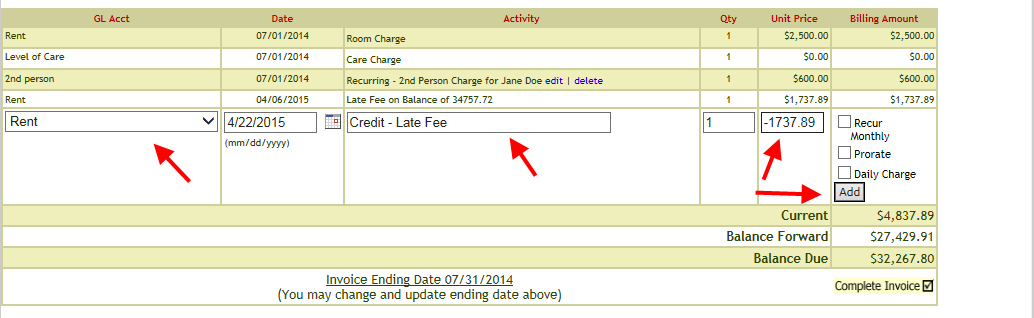
To credit a late fee charge.
1. Open the current Pre-bill for the resident.
2. Select the same GL Account that the late fee is assigned to in the GL Acct dropdown.
3. Enter date, activity description, and the amount in credit(-) to offset the late fee charge.
Was this article helpful?
That’s Great!
Thank you for your feedback
Sorry! We couldn't be helpful
Thank you for your feedback
Feedback sent
We appreciate your effort and will try to fix the article