Pop-ups and reports will behave inconsistently for 2 reasons:
- Browsers determine how pop-ups (reports) will open. Sometimes they will open behind the window you are working in. This article explains how to work with this feature in browsers under the heading Steps when pop-ups or report do not display.
- Sometimes you will get pop-ups and reports to work but on very inconsistent basis and the steps in this article do not work. This means your browser settings need to be configured for Vitals.
- Long Term customers will need to use these directions to configure browser for pop-ups and Crystal Reports.
Configure Browser for Vitals and Crystal Reports - Customers that are new to Vitals (late 2015) do not use our legacy Crystal Reports will need to use these directions to configure browser for pop-ups and reports.
Configure Browser for Vitals
Steps when pop-ups or reports do not display:
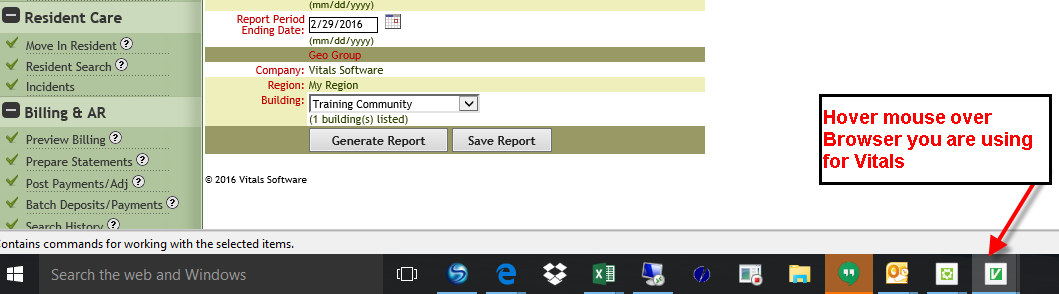
- Hover mouse over the browser icon (Your icon may look different than screenshot)
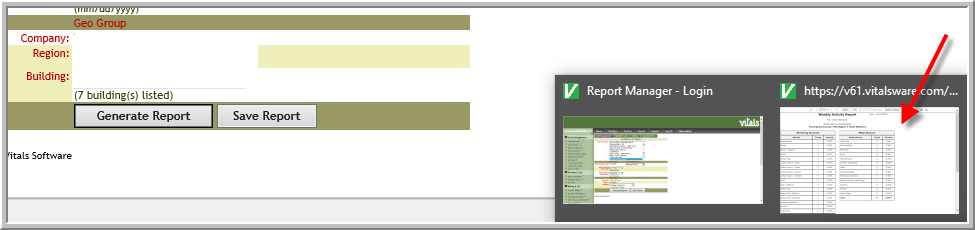
- Click the icon on the far right or if you have a series of links click the last link. (Sometimes you may need to click several icons or links until you can view pop-up or report)
Was this article helpful?
That’s Great!
Thank you for your feedback
Sorry! We couldn't be helpful
Thank you for your feedback
Feedback sent
We appreciate your effort and will try to fix the article