We have 2 types of reports SSRS and Crystal Reports. It is possible to export both types of reports in various formats.
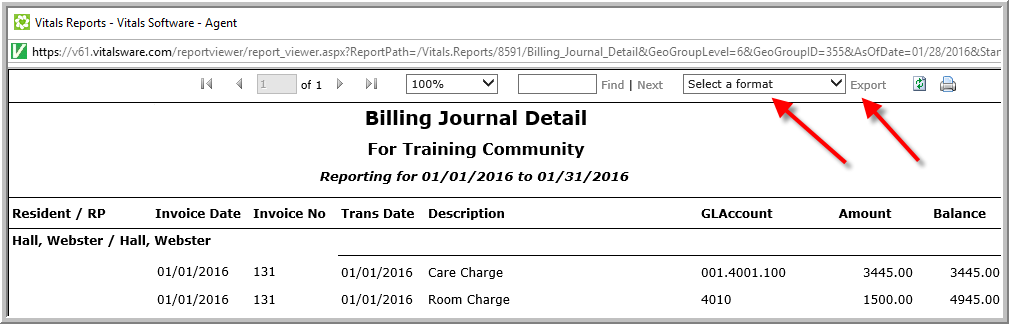
To export an SSRS report, refer to the screenshot below.
Crystal Reports are our legacy reports. Crystal Reports will only work properly using Internet Explorer. (Some companies do not have this type of report available in their portals.) If you do have this type of report, click the Envelope icon, click Save as Type down arrow and select Microsoft Excel, Microsoft Word or Rich Text Format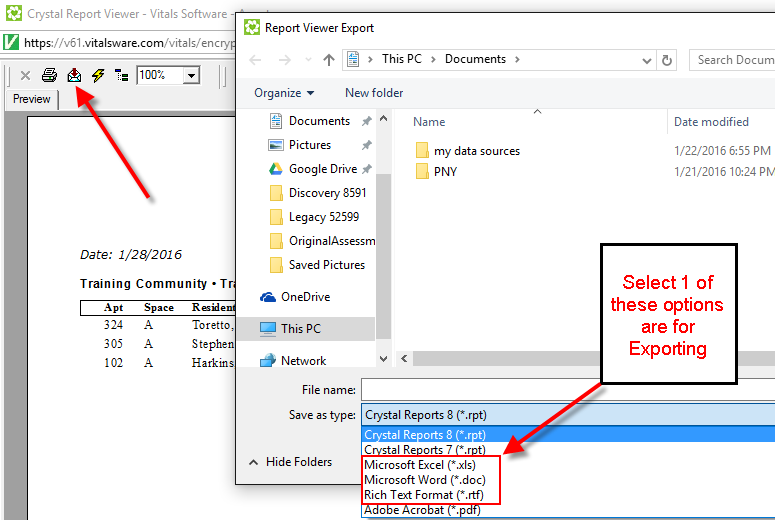
Note: If you get a Crystal Report error or the Envelope does not display it means that your computer settings have not been configured for Vitals. Please refer to this article to configure your setting for Vitals.
Was this article helpful?
That’s Great!
Thank you for your feedback
Sorry! We couldn't be helpful
Thank you for your feedback
Feedback sent
We appreciate your effort and will try to fix the article